
If you've been managing websites or sending newsletters over the past couple of years, you've probably noticed something alarming: your legitimate emails are suddenly vanishing into the void.
Welcome to email delivery hell.
What used to be considered "best practice" is now a rigid gatekeeper. Major inbox providers like Google and Yahoo have moved from a "filter-first" to a "reject-first" policy. If your backend infrastructure isn't configured perfectly, your messages aren't even making it to the spam folder anymore- they are being outright rejected at the server level.
After 17 years in the web design trenches, I've seen the landscape shift dramatically. Here is a breakdown of why email deliverability is so difficult right now, and the exact solutions I use to ensure messages actually reach the inbox.
Why Delivery is Failing in 2026
The massive shift started a couple of years ago but has reached peak enforcement this year. The major providers have established zero-tolerance rules for unauthenticated mail to combat phishing and spam. Here is what is actively blocking your emails today:
- Mandatory Authentication: Sender Policy Framework (SPF) and DomainKeys Identified Mail (DKIM) are no longer optional. If you send bulk mail, you also need a strict Domain-based Message Authentication, Reporting, and Conformance (DMARC) policy.
- The 0.3% Spam Cliff: Google actively monitors user-reported spam rates. The goal is to stay below 0.10%. If your complaint rate hits 0.30%, your deliverability degrades instantly, and it is notoriously slow to recover.
- Misaligned Domains: It isn't enough to just have DKIM or SPF set up; the authenticated domain must perfectly match the visible "From" address.
The Solutions that I Rely On
When moving away from traditional CMS backends to build modern, lightning-fast static sites- like the HTML and Vite projects I frequently deploy on Cloudflare- you don't have a traditional server to process mail. You have to rely on third-party services, and choosing the right ones is critical for surviving the current delivery climate.
1. Zoho Mail for Rock-Solid Infrastructure
For custom domain email (hello@yourdomain.com), I consistently rely on Zoho Mail. Unlike shared hosting where a single bad actor on the server can ruin the IP reputation for everyone, Zoho maintains extremely strict outbound spam controls. This protects their server reputation, which directly protects your deliverability.
Zoho also makes it straightforward to configure your DNS records (SPF, DKIM, DMARC) directly in your registrar or Cloudflare. It functions reliably as a secure SMTP relay if you need to route transactional emails from an application.
2. Formspree.io for Static Site Forms
Since static sites lack a PHP backend to process contact forms, I use Formspree to bridge the gap.
You simply point your HTML form's action attribute to your unique Formspree endpoint, and they handle the server-side delivery. They have adapted well to the new delivery rules, ensuring that the notification emails they route to your inbox don't trigger spam filters.
A Quick Tip on Formspree Alternatives: If you need more complex file uploads or are hitting Formspree's free-tier limits, tools like SplitForms or Formcarry are excellent modern alternatives that offer AI spam filtering and flexible webhooks out of the box.
3. Dedicated Platforms for List Management
When managing a mailing list, I strictly use dedicated email marketing platforms (like Mailchimp). You absolutely cannot send bulk marketing emails from a standard Zoho or Gmail account anymore; you will be permanently blacklisted. Dedicated platforms handle the mandatory one-click unsubscribe headers (RFC 8058) that Google and Yahoo now require, and they provide clear guidance on authenticating your domain so your campaigns actually land.
Actionable Advice to Fix Your Delivery
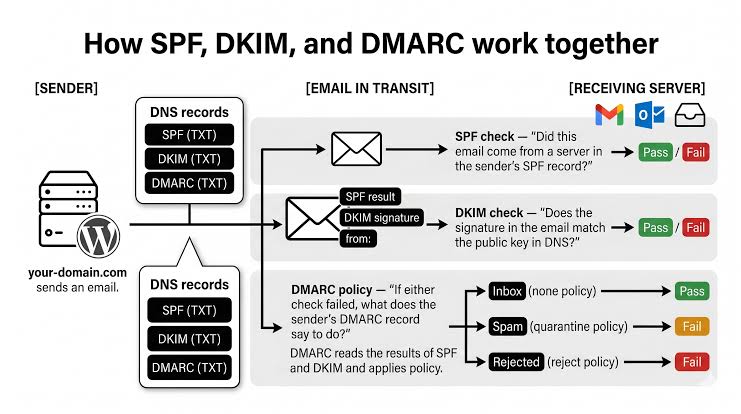
If you are dealing with bounced emails or silent delivery failures, here is your immediate checklist:
| Action | Why It Matters |
|---|---|
| Audit DNS Records | Verify your SPF, DKIM, and DMARC records using a tool like Google Postmaster Tools. A single typo in a TXT record causes silent failures. |
| Prune Your Lists | Stop sending emails to unengaged subscribers. High bounce rates and low open rates destroy your domain reputation. |
| Never Impersonate | Ensure your website's contact form isn't sending emails that claim to be "from" the user's @gmail.com address. This violates DMARC and guarantees a block. |
| Set DMARC to Monitor | Start with a DMARC policy of p=none to receive reports on who is sending mail on your behalf before enforcing strict quarantine or rejection rules. |
Email delivery isn't the "set it and forget it" task it was a decade ago. It requires active infrastructure management. If you configure your authentication correctly and respect the inbox, you'll stand out simply because your messages actually arrive.